
MDViewer app icon Mac · iPhone · iPad

Read any .md file on Mac — in half a second — MDViewer, Markdown Viewer for Mac

MDViewer is a native Markdown viewer for macOS. Tables, Mermaid diagrams, code and math render exactly right — press Space in Finder or double-click to open. No Electron, no IDE.

Free Lite version · No account · macOS 13+ · Intel & Apple Silicon

Also on iPhone & iPad · Windows coming soon

Free on iPhone & iPad. MDViewer is also a native Mac app — open getmd.ma on your Mac to get it.

MDViewer for Windows is built and in testing. Leave your email and we’ll tell you the day it ships — plus occasional product news. Unsubscribe anytime.

4.9 on the App Store · 1,000+ users on 6 continents
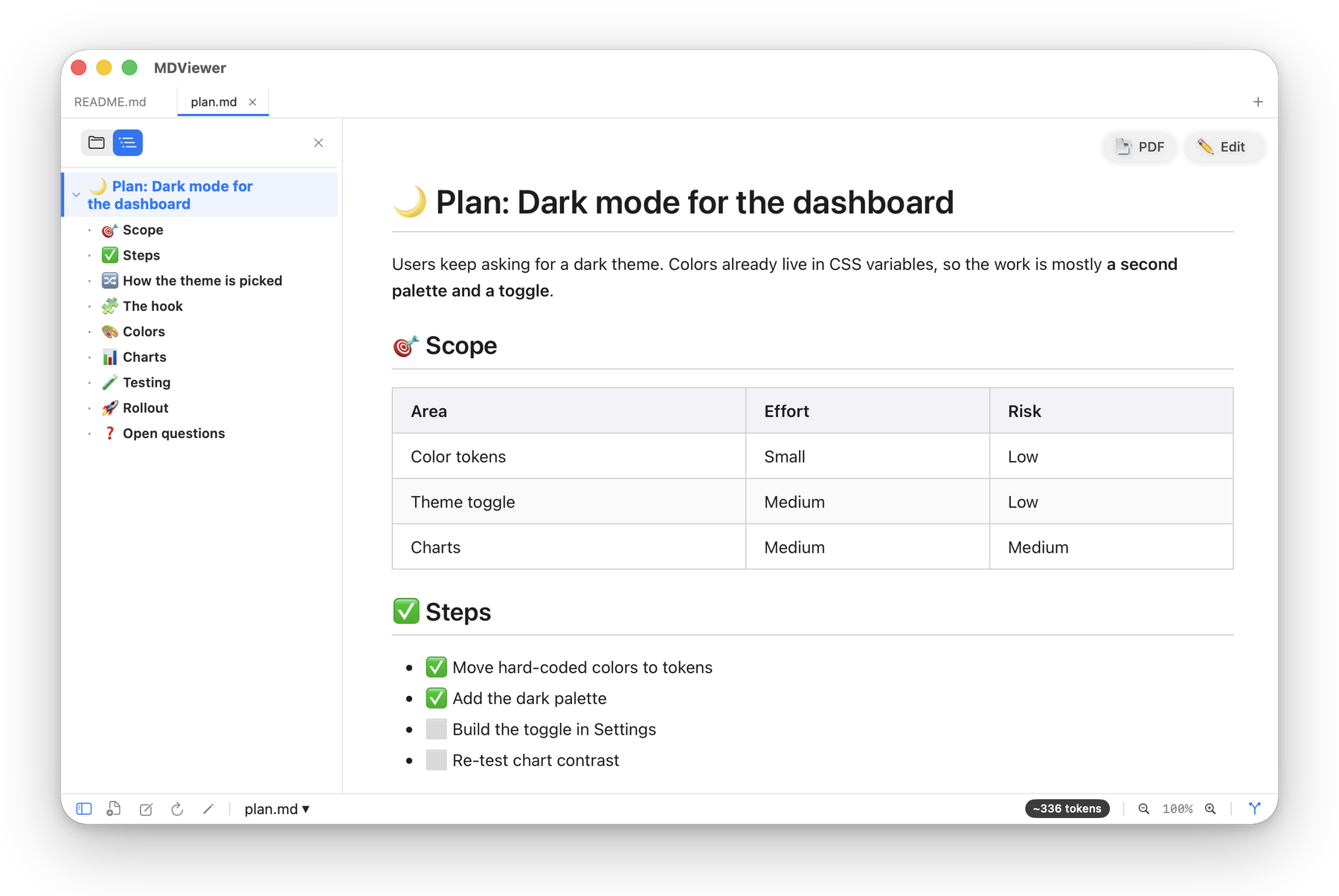
MDViewer showing a Markdown plan with a table of contents, a table and a checklist

Open it. Read it. Done.

Not an IDE. Not a text editor. A dedicated Markdown viewer that does one thing and does it right.

Developers

Cloned a repo and want to read the README? VS Code loads the whole project. MDViewer shows it the moment you press Space in Finder.

AI builders

Claude, ChatGPT and Cursor answer in Markdown — plans, specs, CLAUDE.md. Read them rendered, not as a wall of asterisks and pound signs.

Writers

Drafts, notes, documentation. See tables, diagrams and code exactly as readers will — fix a typo inline, export a clean PDF.

Managers

Got a spec or a README from engineering? Double-click it and read it like a normal document. No IDE, no terminal.

QuickLook in Finder

Preview Markdown in Finder — just press Space

Click any .md, .json or .mermaid file and Finder’s preview pane already shows it rendered. Press Space for a full Quick Look — tables, code blocks and diagrams, no app to launch. Installs automatically.

Mermaid diagrams

Diagrams that render, not code you have to imagine

Flowcharts, sequence, ER and Gantt diagrams render as crisp SVG right inside your document. Click any diagram to zoom full-screen. Follows light and dark mode.

Mermaid sequence diagram rendered in MDViewer

Inline editor

Fix a typo without switching apps

Double-click any word — the editor opens with the cursor right there. Make the change, press ⌘S to save and Esc to go back to reading.

Inline Markdown editor in MDViewer with a typo just fixed

Git history & diff

See what changed — no Terminal needed

Browse a file's commit history in the sidebar. Click a commit for a color-coded diff with line numbers; one click takes you back to the current version.

Git history panel with a color-coded diff of a Markdown file

Themes & reading fonts

Comfortable to read — at noon or at 2 a.m.

Light, Dark and Sepia themes, four dark-mode text tones from cool to warm, and fonts designed for dyslexia — OpenDyslexic, Atkinson Hyperlegible, Lexend and Andika — with extra-comfortable spacing.

The same document in MDViewer's Light, Dark and Sepia themes
Download Free Download on the App Store Join the Windows waitlist

Free Lite version · No account · macOS 13+

Free on iPhone & iPad · Also a native Mac app

Built and in testing · Available now for Mac, iPhone & iPad

Built in SwiftUI. Measured on real Macs.

0.45s

median time to open a file

89%

of files open in under a second

<80MB

of memory in everyday use

Measured across 746 file opens on a range of Macs with different chips, MDViewer 1.33, October 2026. For comparison, VS Code typically uses 400–800 MB.

Why not just use…

People love MDViewer

Trusted by 1,000+ users across 6 continents

★★★★★
"I've been on a quest to find the ultimate native Markdown viewer for the Mac. I've spent weeks trying all sorts of free apps and open source viewers. At the end of the day, MDViewer came out on top. The best part is that the developer actively updates the app regularly!"
EddyGeez! · Mac App Store
★★★★★
"I work with markdown daily and it always bugged me that it just showed raw text in Finder. Installed this, hit Space and got a rendered preview. That alone is worth it. Also, PDF export works fine."
Thinker-Drinker · Mac App Store
★★★★★
"I've been bouncing between easily 10 other Markdown editors. All of them have shortcomings. MDViewer is the only one that actually does everything I need. The way it renders Mermaid diagrams in-line is perfect!"
App-Reviewer-Guy · Mac App Store
★★★★★
"It opens .md files instantly, has a clean native interface, and doesn't feel overloaded. It's great for reading notes, README files, technical documentation, and AI-generated Markdown documents."
bart.loves.canada · Mac App Store
“
"Amazing, it works beautifully! What a treat to get a bug fix overnight! Many thanks!"
Jason S. · User email
“
"My partner uses the inline Mermaid previewer quite a lot. It's crazy how most apps can't even get that right."
Jon B. · User email
“
"Native development is night and day compared to Electron. Everything flies! The attention to small details really shows — and the way it renders with heading separators is a joy to read."
Evgeny G. · User feedback
“
"Best software for .md files. Just crossed 1,000 users — here's to 1,000,000 next!"
Roman C. · Threads
★★★★★
"Quick preview on Mac with Space key is really cool! Overall the app is neat and reliable."
Natalya F. · Trustpilot
★★★★★
"Fast and simple, noiseless UX. Love it!"
Anna L. · App Store
Download Free Download on the App Store Join the Windows waitlist

Join 1,000+ users · Free Lite version · macOS 13+

Free on iPhone & iPad · Also a native Mac app

Built and in testing · Available now for Mac, iPhone & iPad

Small details, done right

Export Markdown to PDF

Clean pagination, images included

JSON File Viewer

Collapsible tree, one-click format

Math Formulas (KaTeX)

Inline & display

Images in Markdown

Local, remote & Obsidian embeds

Links Between Files

Open linked docs, jump to sections

File Tree & Folders

Browse a whole repo's docs

Focus Mode

Distraction-free, with ambient sound

Your Default Markdown App

Double-click opens in MDViewer

Start free. Upgrade once.

Lite is free with no time limit. Pro is a one-time purchase — no subscription on Mac.

Lite

Free

no credit card needed

  • Full Markdown rendering
  • Mermaid diagrams
  • QuickLook in Finder
  • Syntax highlighting
  • JSON viewer
  • Themes & reading fonts
  • Focus Mode
  • Up to 3 tabs
Download Lite

No account · macOS 13+

Pro for Mac

$9.99 one-time

pay once, keep it

  • Everything in Lite
  • Inline editor (⌘E)
  • Git history & diff
  • File tree & folders
  • Export to PDF
  • KaTeX math formulas
  • Unlimited tabs
Buy Pro

One-time payment · via Paddle

On iPhone or iPad? Get MDViewer for iOS — a separate app, free on the App Store, with Pro available inside.

Questions

Not on Mac. MDViewer Pro for Mac is a one-time $9.99 purchase — pay once and keep it. Lite stays free.
Yes. Lite is free with no time limit and no account. It renders everything Pro does — Pro adds the inline editor, Git history, file tree, PDF export, math and unlimited tabs.
No. MDViewer opens your files where they already are and keeps them as plain Markdown. Nothing is imported, converted or moved — uninstall it and your files are exactly as before.
Markdown (.md, .markdown), Mermaid (.mmd, .mermaid), JSON, YAML (.yaml, .yml) and plain text. GitHub-flavored Markdown, raw HTML from READMEs, Obsidian image embeds, math and diagrams render as you’d expect.
A viewer first: files open rendered and ready to read. When you spot something to fix, the Pro inline editor opens right where you double-click, and ⌘S saves plain Markdown. For long-form writing all day, a dedicated editor may suit you better.
It’s the same app. The direct download gets new versions first — Mac App Store updates usually arrive a few days later because of Apple’s review.
MDViewer for iPhone and iPad is a separate app, free on the App Store. The Windows version is built and in testing — leave your email and we’ll tell you the day it ships.

Yes. Your files never leave your Mac — MDViewer renders everything locally, with no account and no cloud uploads. The app sends anonymous usage and performance stats, never file names, paths or contents. Details in our Privacy Policy.
Often. Version 1.33 shipped on October 15, 2026 with reading fonts for dyslexia and new dark-theme tones. Every release is in the changelog.
macOS 13 Ventura or later, natively on both Apple Silicon and Intel Macs.
MDViewer app icon

Download MDViewer — Lite is free

No account. No subscription on Mac. Upgrade to Pro only if you need it.

Download Free Mac App Store

Free Lite version · macOS 13+ · Intel & Apple Silicon

Download on the App Store

Free on iPhone & iPad · Also a native Mac app

Built and in testing · Available now for Mac, iPhone & iPad